The Clock Log, and fixing a punch
Every clock event, and how to add, edit or remove one with a reason.
- Owners
- Admins
- Team leads
- Payroll
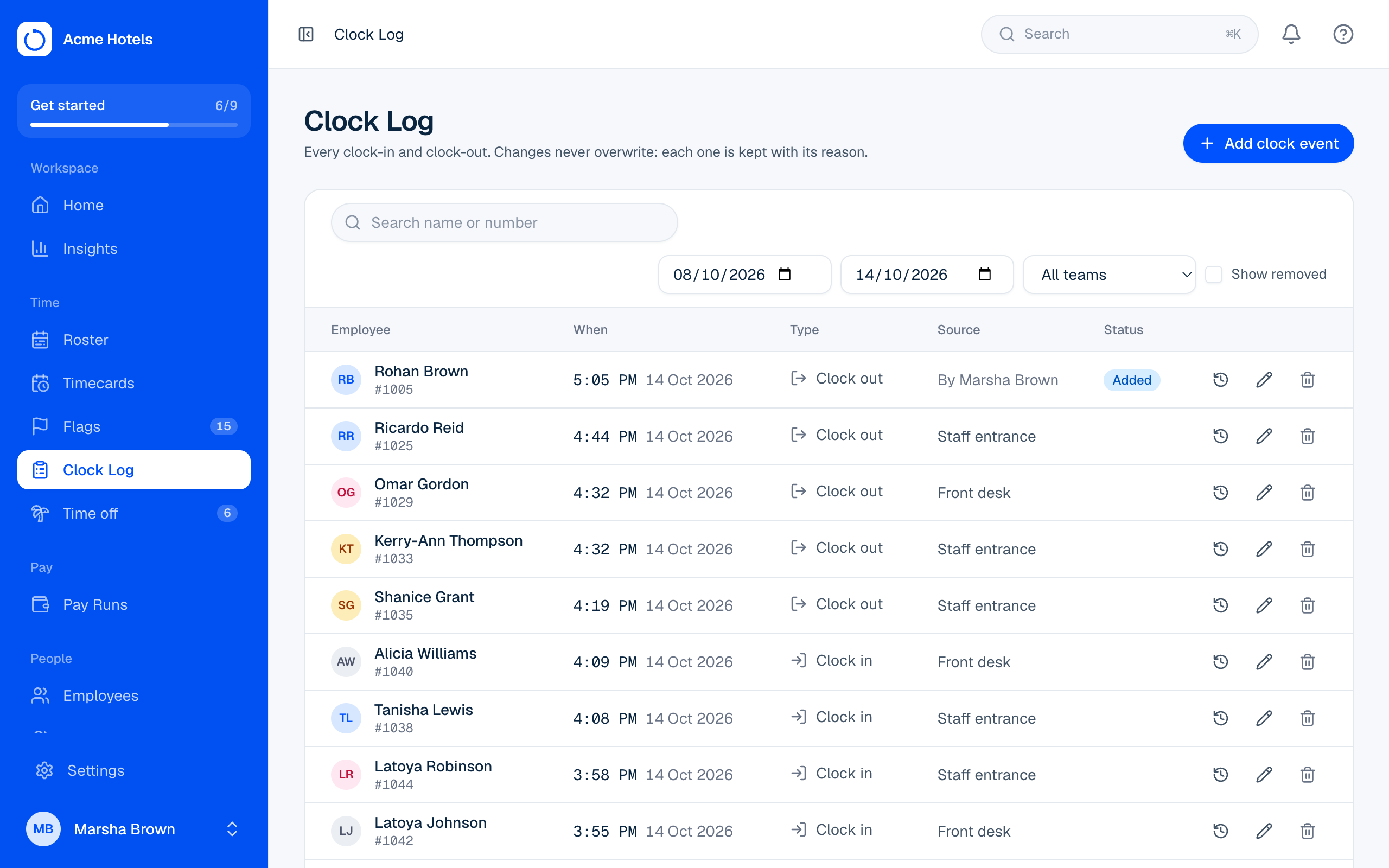
The Clock Log lists every clock event for the people you look after. Filter it by date, team, or name and number. The Source column shows where each punch came from: a Clock Station, Me (with the location, and an Outside badge if it wasn't at an allowed one), a time clock (with how they identified themselves), or a manager.
Fix a punch
- Missed one? Choose Add, pick the person, time and direction, and say why.
- Wrong time? Choose Edit on the event.
- Shouldn't be there? Choose Remove.
A reason is always required. Pick one of your workspace's usual reasons (add detail if you like) or choose Other… and type it. Owners and admins set the list in Settings › Workspace under Clock Log reasons. Nothing is ever overwritten: History shows every version and who made it. The person's timecard is worked out again straight away.
Related guides
Still stuck? WhatsApp us.
Have your workspace address and the page you were on ready. With your permission we can look at it with you.